
Profiles and safety
A profile is a saved connection: one transport, its settings, and a safety policy. The TUI previews a profile before it connects, so you see exactly where it will bind and what it may send.
Two ways in
Section titled “Two ways in”- With a profile.
bacnet tuiopens the profile dialog, andbacnet tui --profile NAMEgoes straight to that profile’s preview. Flags you add on the command line override the saved values for this run only; they are never written back. A flag for another transport, such as--porton an SC profile, is an error. - Flags only. Global network flags without
--profile, or--no-profile, connect with those flags and read or write no profile. This is also the only way to use B/IPv6. A flags-only session can’t arm writes, because the write ledger and audit log live in a profile’s workspace.
On B/IP without -i, a flags-only session lists the host’s IPv4 interfaces in a dialog first; with a single interface it uses that one without asking.
The profile dialog
Section titled “The profile dialog”p opens the dialog from any screen. It has three views: the list, a preview, and the editor.
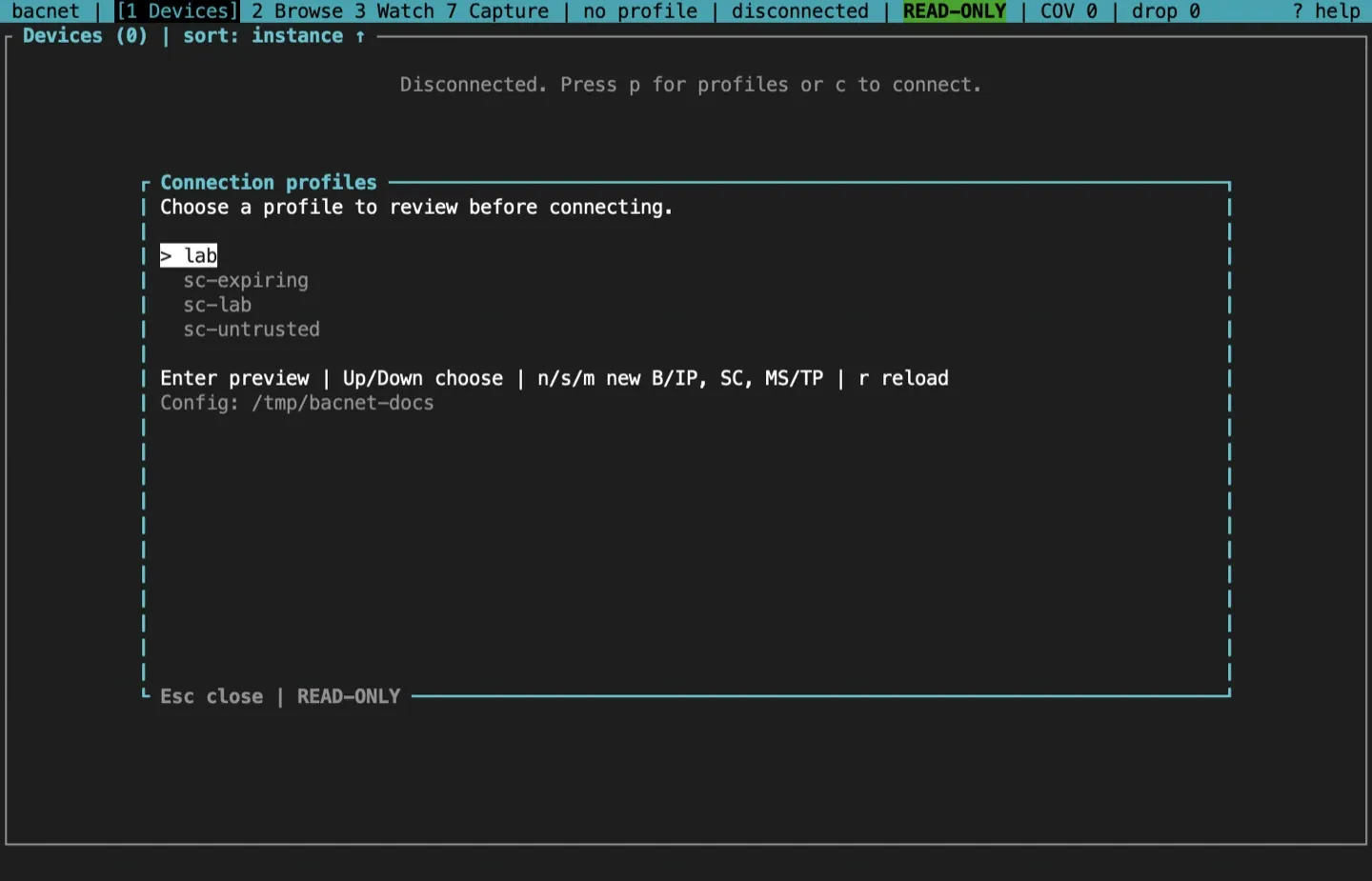
In the list, Up and Down (or Tab and Shift-Tab) choose, Enter previews, r reloads the list from disk, and n, s or m create a B/IP, BACnet/SC or MS/TP profile. The dialog shows the config directory at the bottom.
Create a profile
Section titled “Create a profile”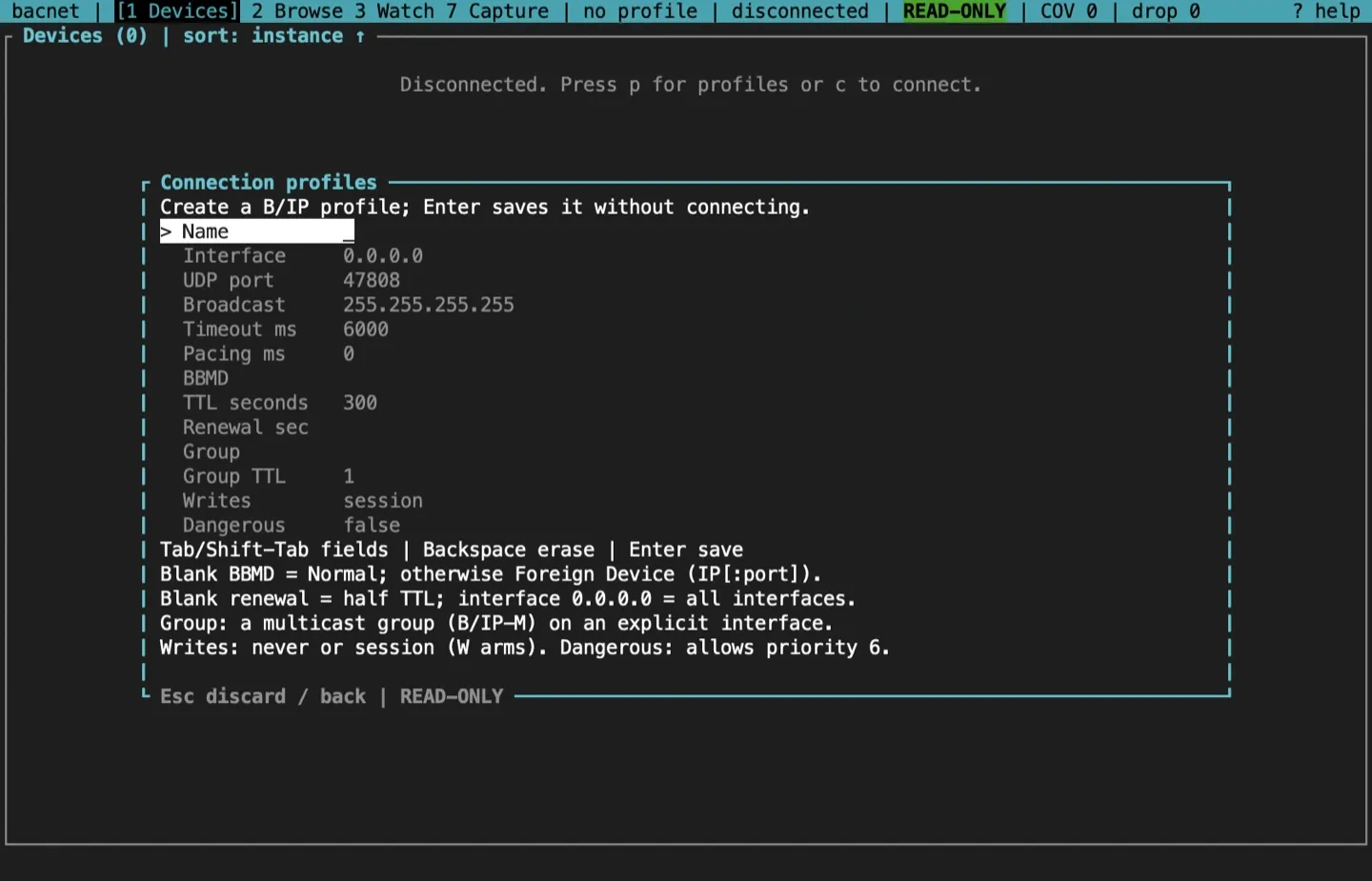
Tab and Shift-Tab (or Up and Down) move between fields, Backspace erases, and Enter saves without connecting. Esc discards the draft. A failed save keeps the draft and shows why; a new profile never overwrites an existing name.
| Transport | Fields |
|---|---|
| B/IP | Name, interface, UDP port, broadcast address, APDU timeout, pacing, BBMD, TTL, renewal, multicast group, group TTL, writes, dangerous |
| BACnet/SC | Name, hub URL, failover hub URL, CA, certificate and key files, VMAC, device UUID, timeout, pacing, connect timeout, reconnect (on or off), writes, dangerous |
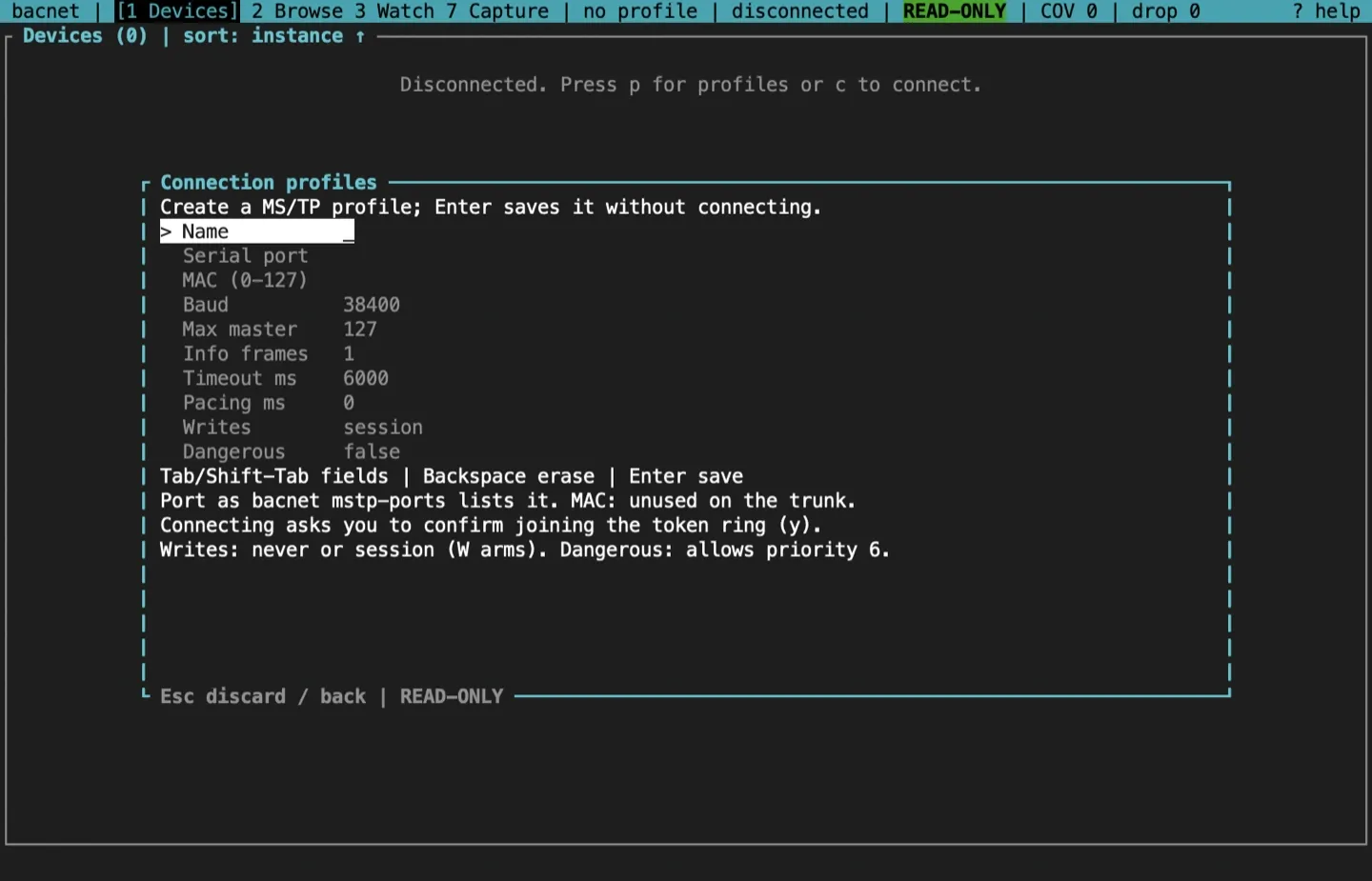
| MS/TP | Name, serial port, MAC (0 to 127), baud, Max_Master, Max_Info_Frames, timeout, pacing, writes, dangerous |
Some fields change the mode as well as a value:
- B/IP BBMD. Blank runs in normal mode. An address (
IPorIP:port) registers as a foreign device with that BBMD. A blank renewal renews at half the TTL. Interface0.0.0.0binds every interface, and port0takes any free port. - SC files. Only the paths of the PEM files are saved, never their contents, and relative paths are made absolute. A blank VMAC and device UUID are generated once, when the profile is first saved or first connected, and then kept, so the device UUID stays the same across restarts. After that the editor shows them read-only.
- MS/TP port. Use the name
bacnet mstp-portslists, and a MAC no other station on the trunk uses.
Preview and first-use attestation
Section titled “Preview and first-use attestation”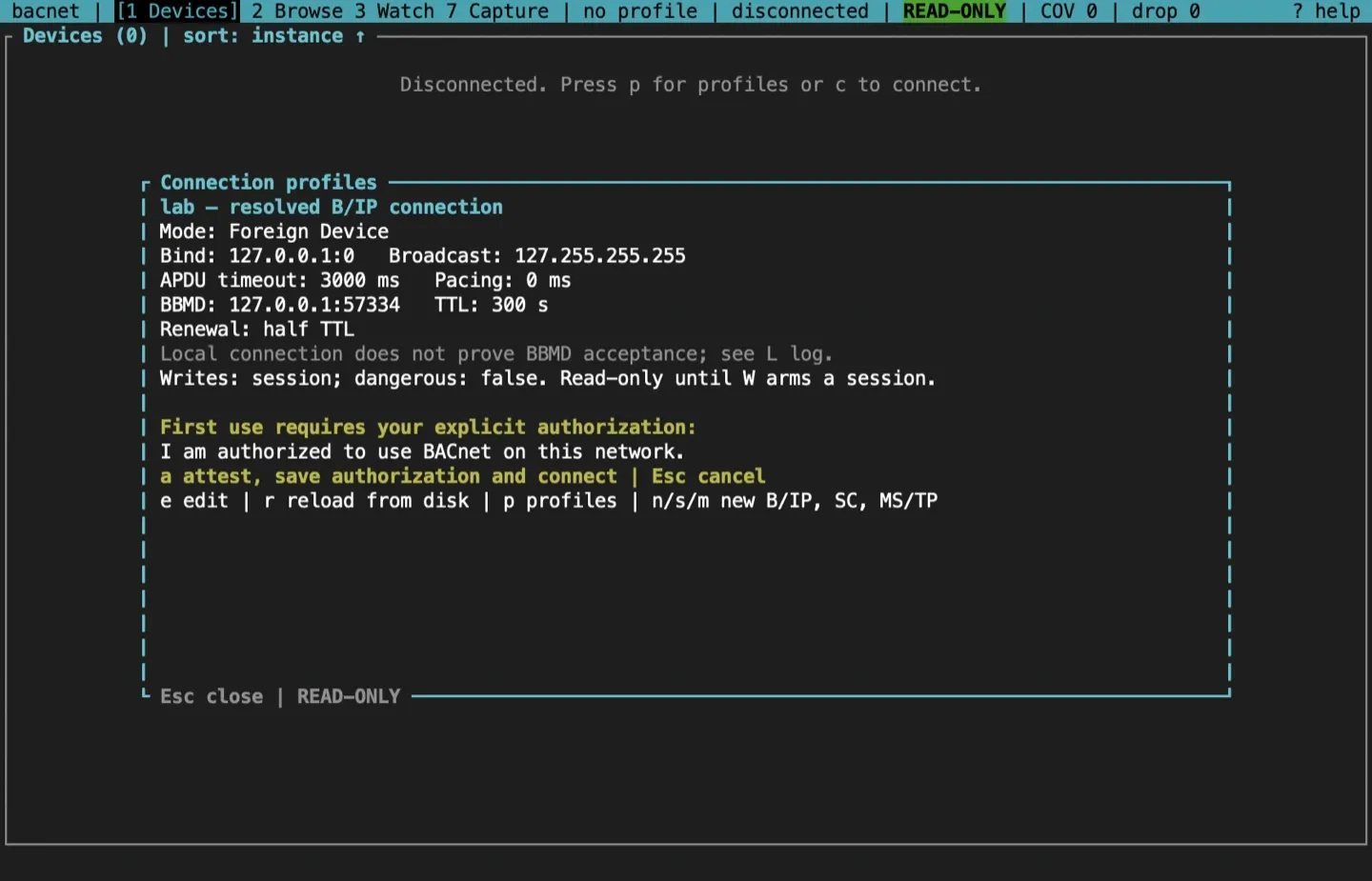
The preview shows the settings that will be used, after any flag overrides: the mode, the bind address and broadcast, the timeouts, the BBMD and TTL, and the safety policy. In it, e edits, r reloads the file and checks it again, p returns to the list, and x disconnects a live session while the dialog stays open.
The first time you use a profile, the preview asks you to confirm that you are authorized to use BACnet on that network. Press a to attest: the TUI saves the time of your attestation in the profile, and only then builds a client. Enter alone does not attest. Later connections use Enter or c. Editing the saved network settings clears the attestation, and so does raising the write policy.
For a BACnet/SC profile the preview also checks the credential files before anything is sent; see the BACnet/SC screen.
Session levels
Section titled “Session levels”The status bar always shows the level:
| Level | What the TUI may send |
|---|---|
READ-ONLY |
The default. Discovery, reads, COV subscriptions with a finite lifetime, and a foreign-device registration. No writes |
WRITE mm:ss |
A write session is armed, shown in red with its countdown. Writes are allowed, each one previewed and confirmed |
PASSIVE |
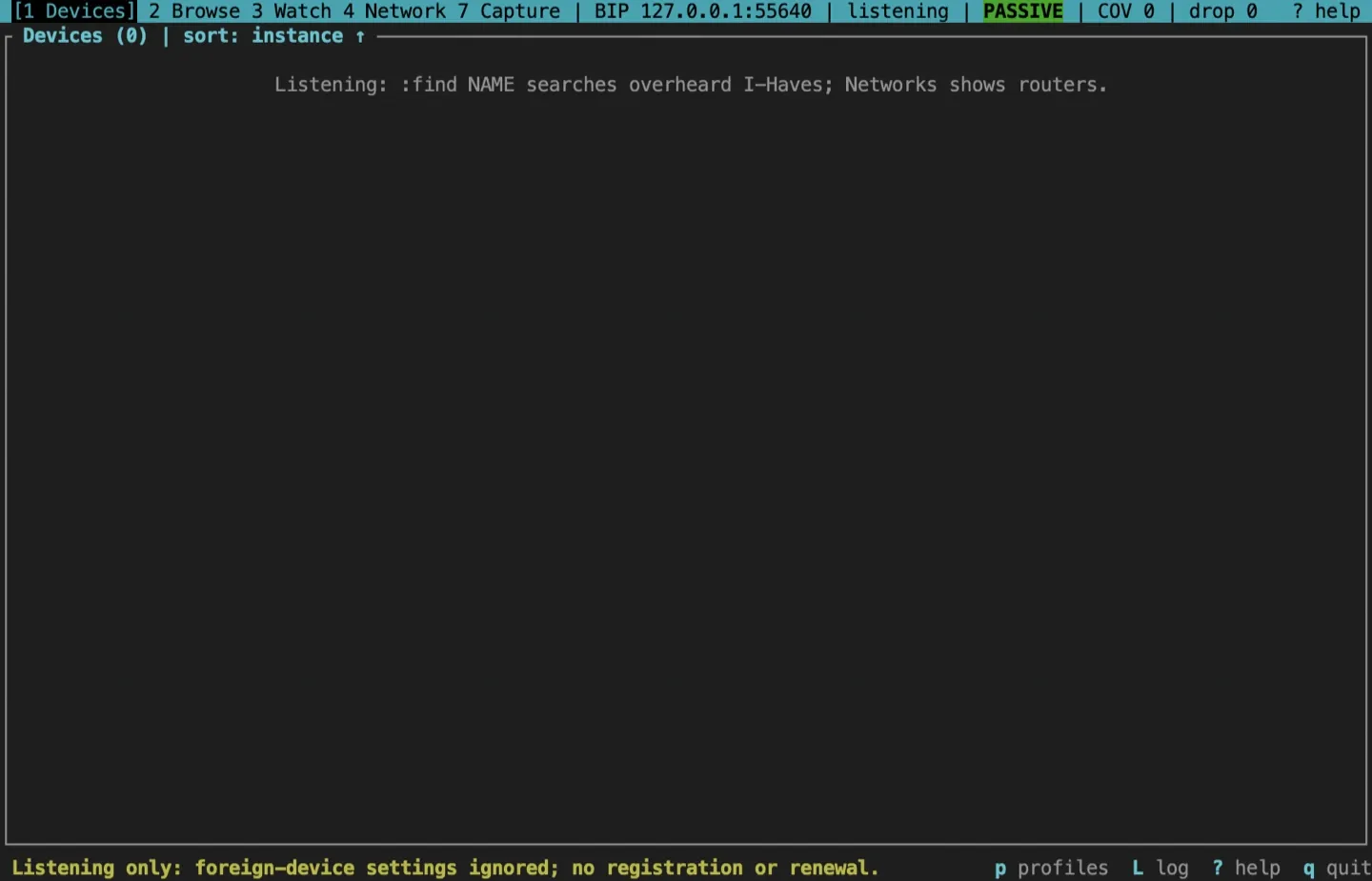
Nothing at all. A B/IP profile only listens, on a receive-only socket, and so does the MS/TP monitor |
Passive sessions
Section titled “Passive sessions”bacnet tui --profile plant-a --passive--passive only listens. On a B/IP profile it binds a receive-only socket, with no BACnet client behind it, and decodes what arrives: :find NAME searches the I-Haves it has overheard, and the Networks tab shows the routers it has heard. Nothing is transmitted: no Who-Is, reads, subscriptions, writes or replies. Foreign-device settings are ignored, so no registration is sent either. Keys that would transmit show a notice instead. You can still open the profile dialog and read the session ledger with u. Other transports and B/IP multicast can’t listen passively; the connection fails and says why. Use it to check a profile, to see what is on the network, or to look at what an earlier session left behind, without sending anything.
The safety policy
Section titled “The safety policy”Each profile has a [safety] table:
writes = "session", the default, letsWarm a write session.writes = "never"makesWsay why and arm nothing.dangerous = trueallows a write at priority 6 inside an armed session. It needswrites = "session". It also allows:dccand:reinit.
Write safely explains arming, the confirmation tiers and the ledger.
The MCP table
Section titled “The MCP table”A profile may also hold an [mcp] table for bacnet mcp serve, the MCP server for AI agent hosts, which connects through the same profiles. It limits the networks and devices an agent may reach, how fast it may send, whether it may send a broad Who-Is, and whether it is offered writes. The TUI keeps the table when it saves the profile but doesn’t use it, and its writes and dangerous settings don’t apply to the server. The server needs its own first-use authorization, bacnet mcp authorize --profile NAME, which is recorded in the table and cleared when the table widens what an agent may reach. Use rusty-bacnet with AI agents shows an example table and links the reference that lists every key, its default and its limits.
Connect, disconnect and reconnect
Section titled “Connect, disconnect and reconnect”cconnects, or reconnects after a disconnect. A profile session shows its preview again first.xdisconnects, or cancels a connection that is still being made. The TUI waits for the transport to be released before you can load or edit another profile.- A failed connection stays on screen with the reason, so you can fix the settings (
p) and retry (c).
Disconnecting stops the local foreign-device renewals. The BBMD’s entry for you is not removed at once; it expires after its TTL and grace period (Annex J.5.2).
Where profiles live
Section titled “Where profiles live”| Platform | Config directory |
|---|---|
| Linux | $XDG_CONFIG_HOME/bacnet, usually ~/.config/bacnet |
| macOS | ~/Library/Application Support/bacnet |
| Windows | %APPDATA%\bacnet\config |
BACNET_CONFIG_DIR replaces the whole directory, workspaces included:
BACNET_CONFIG_DIR=/srv/bacnet/site-a bacnet tuiInside it, profiles/NAME.toml holds each profile and workspaces/NAME/ holds that profile’s session ledger (ledger.json), audit log (audit.jsonl) and watch-list CSV logs. Names are 1 to 64 ASCII letters, digits, _ or -. If you change a file outside the TUI, press r in the dialog to reload it. A save that finds the file changed on disk is refused and leaves the file alone.
A B/IP profile file looks like this; the terminal UI reference shows the SC and MS/TP tables:
version = 1transport = "bip"# authorized_at_unix is added after the first-use attestation.
[bip]interface = "10.0.1.5"port = 47808broadcast = "10.0.1.255"timeout_ms = 6000min_interval_ms = 0ttl = 300# bbmd = "10.0.2.1:47808"
[safety]writes = "session"dangerous = false
Sources and release scope
Section titled “Sources and release scope”These pages describe v0.15.0. Source review is not a claim of hardware qualification.
Profiles and connection lifecycle · Profile store · Config directory.
CONTINUEDiscover devicesSend a scoped Who-Is, sort and filter the table, and find objects by name.Release v0.15.0 ·Build and integrate. Pre-1.0 APIs; partial conformance.Support & limitations