
Try a local client/server lab
No controller required. This lab runs a real Rusty BACnet server and client on your machine. It reads an example analog input, checks the response, and closes both endpoints.
Both endpoints bind to 127.0.0.1. The script does not perform discovery, request a COV subscription, or write a remote property. It is a learning fixture, not a production server or a hardened multi-user service.
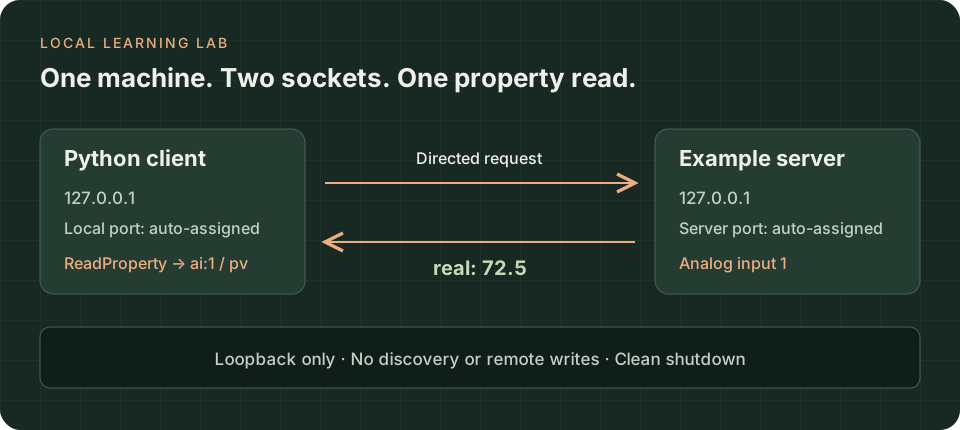
A Python client sends a directed ReadProperty request over loopback UDP to a local example server. Analog input 1 returns a real value of 72.5. The operating system assigns separate local ports; both endpoints then stop.
1. Prepare the Python environment
Section titled “1. Prepare the Python environment”Complete the Python path in Install the tools. The script checks for rusty-bacnet==0.11.0 before it starts. Run it with the interpreter from that environment.
2. Save the lab script
Section titled “2. Save the lab script”Save loopback_lab.py beside your .venv directory. The complete source is also available at the end of this page.
my-bacnet-lab/ .venv/ loopback_lab.pyThis example file belongs to the documentation package; it is not assumed to ship inside the installed Python wheel.
3. Run one complete read
Section titled “3. Run one complete read”.venv/bin/python loopback_lab.py.\.venv\Scripts\python.exe loopback_lab.pyExpected output, with an operating-system-assigned port:
Example server: 127.0.0.1:<assigned-port>Read ai:1 present-value: real: 72.5PASS: directed local read; no remote property writes.Server stopped.The script uses try/finally to stop its server and an async context manager for its client. Startup and reads have finite timeouts. A failure returns a nonzero exit status instead of printing a success message.
4. Optional: read the same server from the CLI
Section titled “4. Optional: read the same server from the CLI”After also installing the CLI, keep the example server open for five minutes:
.venv/bin/python loopback_lab.py --serve --seconds 300.\.venv\Scripts\python.exe loopback_lab.py --serve --seconds 300The script prints a complete command containing the actual server port. Copy that command into another terminal. Substitute the downloaded executable filename when bacnet is not on your PATH.
The printed command sets the CLI’s interface to 127.0.0.1 and its local port to 0, while the target uses the server’s assigned port. These are different sockets. Do not copy port zero into general discovery or persistent COV recipes.
The server stops after the requested duration. Ctrl+C stops it earlier. This is an optional CLI extension of the tutorial; the Python-only round trip above does not require the CLI or libpcap.
When the lab does not pass
Section titled “When the lab does not pass”| Symptom | Next check |
|---|---|
ModuleNotFoundError or version mismatch |
Use the environment’s interpreter; verify its native import and package version. |
| A shared-library error before the CLI starts | On the reviewed Linux release, check the libpcap runtime. Use Python-only mode to separate this from BACnet behavior. |
A bind error after setting --port |
Return to the default --port 0 or stop the process using that port. |
| The client times out | Confirm the server is still running and use the address printed by this run, not an old terminal session. |
No PASS or no clean exit |
Read the error message; do not treat server startup as a successful read. |
Do not solve a failed local lab by replacing 127.0.0.1 with 0.0.0.0 or a building-network interface. Keep the fixture local and investigate the immediate error.
Complete source
Section titled “Complete source”Show the complete loopback_lab.py script
"""A bounded BACnet/IP learning lab on this machine only.
Requires rusty-bacnet==0.11.0 and Python >=3.11. No physical device is needed.Default: create an example server, read its analog input, verify it, and stop.--serve: keep that server available for directed CLI reads for a limited time.Neither mode performs Who-Is discovery, a remote write, or a COV subscription."""from __future__ import annotations
import argparseimport asynciofrom importlib.metadata import PackageNotFoundError, versionimport sys
LOOPBACK = "127.0.0.1"EXPECTED_VERSION = "0.11.0"

def parse_args(argv: list[str] | None = None) -> argparse.Namespace:    parser = argparse.ArgumentParser(description=__doc__)    parser.add_argument("--serve", action="store_true", help="Keep the example server running for directed local reads")    parser.add_argument("--seconds", type=int, default=300, help="Server duration in serve mode (1–3600; default 300)")    parser.add_argument("--port", type=int, default=0, help="Server UDP port; 0 chooses an unused ephemeral port")    args = parser.parse_args(argv)    if not 0 <= args.port <= 65535:        parser.error("--port must be in 0..65535")    if not 1 <= args.seconds <= 3600:        parser.error("--seconds must be in 1..3600")    return args

def check_version() -> None:    try:        installed = version("rusty-bacnet")    except PackageNotFoundError as exc:        raise RuntimeError("Install rusty-bacnet==0.11.0 in this Python environment first.") from exc    if installed != EXPECTED_VERSION:        raise RuntimeError(f"This lab targets {EXPECTED_VERSION}; installed package is {installed}. Use a matching environment.")

def require_local_address(address: str) -> str:    """Fail closed if the server reports an unexpected interface or port."""    host, separator, raw_port = address.rpartition(":")    if separator != ":" or host != LOOPBACK or not raw_port.isdecimal() or not 1 <= int(raw_port) <= 65535:        raise RuntimeError(f"Expected a bound loopback endpoint, got {address!r}.")    return address

async def run_lab(args: argparse.Namespace) -> None:    check_version()    # Deferred import means --help and argument checks do not need the extension.    from rusty_bacnet import BACnetClient, BACnetServer, ObjectIdentifier, ObjectType, PropertyIdentifier
    server = BACnetServer(        device_instance=1234,        device_name="Local documentation lab",        interface=LOOPBACK,        port=args.port,        broadcast_address=LOOPBACK,    )    server.add_analog_input(instance=1, name="Zone Temperature", units=64, present_value=72.5)    try:        await asyncio.wait_for(server.start(), timeout=5)        address = require_local_address(await server.local_address())        print(f"Example server: {address}", flush=True)        if args.serve:            print("Open another terminal. Substitute your installed executable for bacnet:", flush=True)            print(f"bacnet --interface {LOOPBACK} --port 0 read {address} ai:1 pv", flush=True)            print(f"Stops after {args.seconds} seconds, or press Ctrl+C.", flush=True)            await asyncio.sleep(args.seconds)        else:            async with BACnetClient(                interface=LOOPBACK, port=0, broadcast_address=LOOPBACK, apdu_timeout_ms=1500            ) as client:                value = await asyncio.wait_for(                    client.read_property(                        address, ObjectIdentifier(ObjectType.ANALOG_INPUT, 1), PropertyIdentifier.PRESENT_VALUE                    ),                    timeout=5,                )                if value.tag != "real" or value.value != 72.5:                    raise RuntimeError(f"Unexpected sample result: {value.tag}: {value.value}")                print(f"Read ai:1 present-value: {value.tag}: {value.value}", flush=True)                print("PASS: directed local read; no remote property writes.", flush=True)    finally:        await asyncio.wait_for(server.stop(), timeout=5)        print("Server stopped.", flush=True)

def main() -> int:    args = parse_args()    try:        asyncio.run(run_lab(args))    except KeyboardInterrupt:        print("Lab interrupted.", file=sys.stderr)        return 130    except Exception as exc:        print(f"Lab failed: {type(exc).__name__}: {exc}", file=sys.stderr)        return 1    return 0

if __name__ == "__main__":    raise SystemExit(main())
What this demonstrates
Section titled “What this demonstrates”This exercises one directed BACnet/IP property read through the native extension, with application-owned sample data and bounded lifecycle handling. It does not establish discovery, routed operation, MS/TP timing, BACnet/SC security, or full conformance.
During site integration, all eight tutorial tests and the standalone lab passed on macOS 27.0 arm64 with CPython 3.12.13, using the v0.11.0 cp312 wheel from the release workflow linked below. The optional v0.11.0 macOS arm64 CLI also read the loopback server’s value (72.5) and units (64) through a separate ephemeral socket; the server stopped after its 30-second limit. These results cover these local tutorial flows, not PyPI availability, a general wheel/platform matrix, or physical-network interoperability.
The supplied documentation handoff separately records an earlier Python-only round trip on Linux x86-64, CPython 3.13, and the v0.11.0 release-workflow wheel. Its Linux CLI extension was blocked by a missing libpcap runtime. That Linux loader limitation was not retested or cleared by the macOS result.
CONTINUERead a known, authorized deviceMove from loopback to your actual interface and a specific target.Sources
Section titled “Sources”Released server and client example · Python API · Engineering units · Release build.
Release v0.11.0 ·Current development. Follow the scope named on each page. Pre-1.0 APIs; partial conformance.Support & limitations