
Discover devices deliberately
Discovery is a network operation, not a passive scan of a file. Start with the smallest authorized scope that answers your question.
Use a known address first
Section titled “Use a known address first”bacnet discover --target 192.168.1.100 --wait 3The directed option requires an address rather than a device instance or a DNET:instance expression. A known direct read can still be worth testing when a controller does not answer discovery.
Discover a local network
Section titled “Discover a local network”bacnet discover 1000-2000 --wait 3The range limits the requested device instances; it does not make a broadcast into a unicast operation. Confirm the interface, broadcast destination, and network owner approval before expanding the scope.
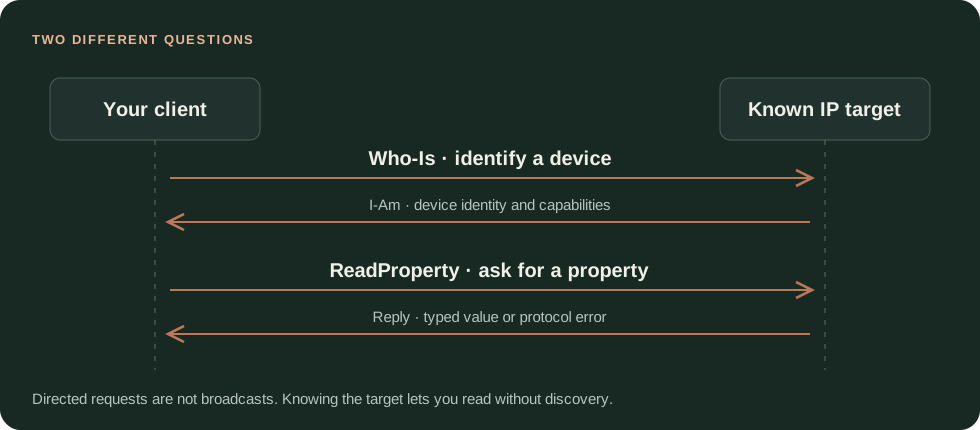
A directed Who-Is followed by an I-Am and a property read.
Work across subnet boundaries
Section titled “Work across subnet boundaries”A documented CLI path registers as a foreign device with an authorized BACnet/IP BBMD before discovery:
bacnet discover --bbmd 192.168.1.1 --ttl 300 --wait 3Use a BBMD designated by the site owner. Registration changes BBMD foreign-device state. It is not a generic VPN or NAT workaround, and it is not part of BACnet/SC or IPv6 setup.
discover --dnet 2 requests discovery for a remote BACnet network. It does not establish that every other command supports 2:1234 as a routed target. In the reviewed v0.11.0 one-shot path, that target form is explicitly rejected. A direct router IP is not automatically equivalent to the downstream device’s BACnet address.
Keep discovery and device-instance lookup in one session
Section titled “Keep discovery and device-instance lookup in one session”bacnet shellInside the shell:
discover 1000-2000devicestarget 1234read ai:1 pvstatusUse an instance that the current session actually discovered. A discovery run in another process is not a documented persistent cache for this shell or a later one-shot process.
Find an object by name
Section titled “Find an object by name”For a one-shot command, use the parser-backed option:
bacnet find --name "Zone Temp" --wait 3The older CLI guide includes positional find examples, but the reviewed one-shot parser declares --name. Shell grammar is a separate surface and must not be assumed identical to the one-shot command line.
When discovery is empty
Section titled “When discovery is empty”Test a known direct property read, confirm the local/remote UDP ports, and check firewall and interface routing. Consider VPN, container, and subnet boundaries before repeating increasingly broad scans. Keep sanitized diagnostics with the actual command and transport when opening an issue.
Sources and release scope
Section titled “Sources and release scope”These instructions target v0.11.0. Source review is not a claim of hardware qualification.
Discovery documentation · Actual CLI parser · Target resolution and dispatch.
Release v0.11.0 ·Current development. Follow the scope named on each page. Pre-1.0 APIs; partial conformance.Support & limitations